
Integration · Ramp Mexico
Your team pays with Ramp. We recover the CFDI.
Ramp has the field for the XML, but getting that CFDI from the merchant is still your problem. Snap the receipt and we recover the document, ready to attach to the Ramp transaction.
The tax trap
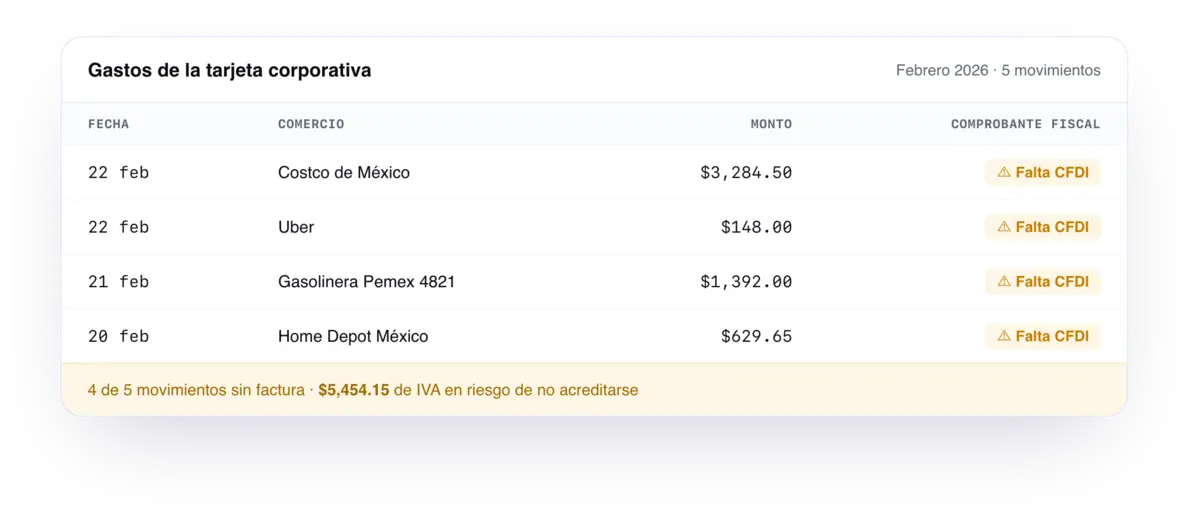
The XML field is there. The right XML isn't.
Ramp logs the expense and gives you a field for the XML, but the XML has to come from the merchant. When the receipt is invoiced with generic data, that merchant usually issues the CFDI with the foreign tax ID XEXX010101000 and use S01, "no tax effect": it doesn't deduct, doesn't credit VAT, and your accountant only finds out at close. We recover the CFDI with your tax details so that Ramp field carries the document that actually deducts.
How it works
Your team pays with Ramp as usual
Fuel, client meals, software, groceries. Nothing changes in their day-to-day or in your card program.
Snap the receipt from the app
Each person photographs their receipt. We do the work with the merchant: portal, tax ID, CFDI use and retries.
The XML arrives ready for Ramp's field
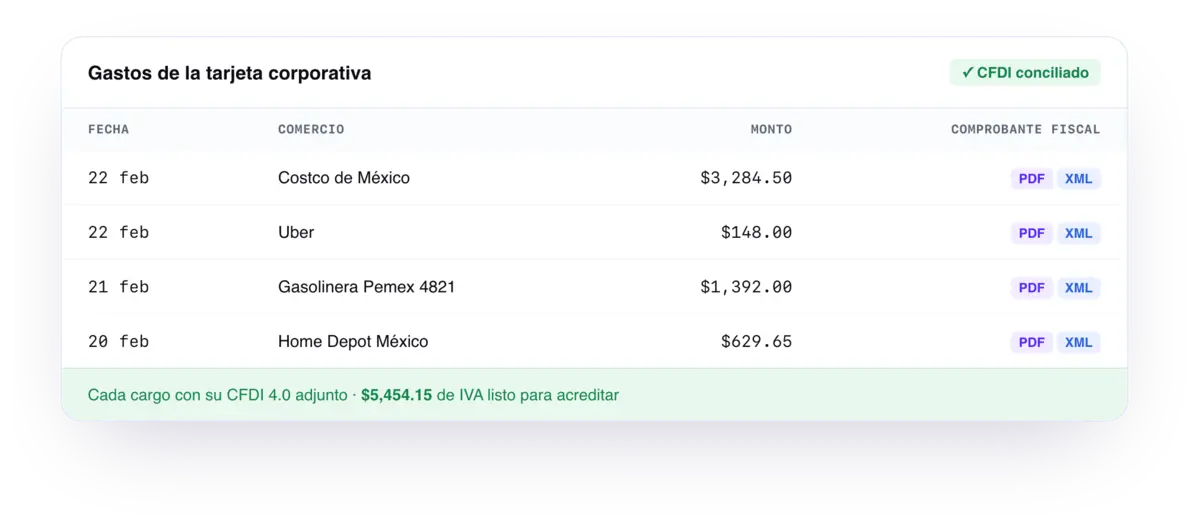
You get the XML and PDF for each expense and attach them to the transaction in Ramp, where the document field already lives. Reconcile as deductible without leaving your flow.
Who it's for
For the spender
You just snap a photo
Photograph the receipt from your phone and get back to work. You never open a portal or chase the merchant: we recover the invoice.
For finance
The XML field stops being empty
Every Ramp transaction arrives with its XML and PDF, ready to attach and reconcile. Close the month with no S01 surprise and no chasing anyone for their document.
Connect your team
Tell us about your team and we'll show you how it would look
No tax data required. We'll route you to the fastest path for your team.
Frequently asked questions
- Does this replace Ramp?
- No, it complements it. Ramp controls spend —cards, budgets, approvals— and Fotofacturas recovers the CFDI for each receipt to fill the XML field with a document that actually deducts. Two pieces of the same flow.
- How does the CFDI get into Ramp's field?
- We deliver the XML and PDF for each recovered invoice: download them from the app or receive them by email and attach them to the transaction in Ramp. For high-volume teams we can tailor the delivery.
- Do I have to switch cards or platforms?
- No. We work with any payment method; you keep using your Ramp and your card program exactly as is. We only close the CFDI gap.
- Does it work with any merchant?
- We work with thousands of merchants across Mexico: gas stations, restaurants, supermarkets, pharmacies and transport. If the merchant issues a CFDI, we go get it.
Recover every peso you can deduct
In 20 minutes we show you how it would look for your team.